Thursday, July 18, 2013

Graduation and Achievement Certificates


If you would like to give students a certificate of achievement for something they have completed, check out this website.  Print off quality custom certificates right from home or the classroom.

Here's the link:

123Certificates

Tuesday, April 2, 2013

Web-based Games that Support JK Reading Skills


Check out these websites to for web-based opportunities for children to gain pre-reading and reading skills.

If you have other web-based games that support pre-reading then please leave them in the comments section. I'd be happy to add them.
 
_________________________________________________
 

In the Classroom:
Please click here to access an easy-to-use portal webpage that you can leave on open on the class computer or iPad for children to access these games.  Children will need to know to press the "Close" button if they wish to switch games or when finished.  Many of these websites are from TVO.

Click here if you would like access to a teaching website containing lesson series focused on JK/SK Language Skills.
________________________________________________ 


Magic Mailbox   (Sound Required)                                                         
Overview:
Children click on the mailbox and out pops a letter. Children will hear the letter name. Click again and the mailbox closes.  Kids gain exposure to letters and their names, and also developes basic computer skills including moving a mouse or pressing the screen if on an iPad.      

Letterella (Sound Required)


Overview:
Beginner level asks the child to press a letter key on the computer keyboard. Letter name is given and a word that and a word that begins with that letter is shown accompanied with a picture. The word is then sounded out and the letters are highlighted as they are sounded out.  The pro level gives an auditory prompt for the child to press a specific letter.  If correct, the letter name is given, a word that begins with that letter is shown with a corresponding picture, and the word is sounded out.  If incorrect after the 3rd try, the answer is given and the correct response is given in full (letter, word, picture, and sounded out).


SignMatch (Sound Recommended)
Overview:
Instructions are verbally given when site is first visited.  Child presses play and 8 cards are face down.  Child tries to find a match for the signs.  Each sign is named when it is turned over, and it is stated for the child whether or not their is a match.  Incorrect matches are automatically turned back over and the child can try again.  When all matches are found the matches are highlighted and renamed for the child.
 
Out of Order (Sound Recommended)

Overview:
Child is prompted to open a box containing 3 pictures of art by clicking on it.  Child is then prompted to put the 3 pieces of art in order onto an art board.  After the 3rd incorrect response the first picture will be placed for the child and the child needs to place the second and third correctly.  Child is prompted to open a new box when complete.
 
Gisele's Big Backyard Book Club
(Sound Required)

Overview:
 Children can select from a number of different books to be read to them.  Stories are stopped at appropriate times to ask questions which support comprehension, and stories are recapped and summarized from time to time, also aiding comprehension.  If the video is watched on a full screen, the escape button on the keyboard will have to be pressed to get back to the home screen.


Sunday, September 16, 2012

Your Options When Hands-On Learning is Overwhelming and Focussed Practice is Required

Today's mathematics is hands-on. This approach to teaching math puts math in context, makes it relevant, promotes problem-solving, creativity, co-operartion, analytical skills, and so much more.

It's wonderful to see such a dynamcic approach to mathematics, but to a student who is struggling specific skills, concepts, and processes, it can be overwhelming to be working on an activity that draws upon so many skills simultaneously.  Sometimes, focussed practice and practical application is what is needed.

If as student does not have a handle on a specific skill, it can make tackling other more encompassing projects frustrating and overwhelming.  Unfortunately, finding quality resources to practice these skills can be difficult. 

Some teachers rely on worksheets found as a result of a google search of the concept or skill, but they are often poorly designed.  The space to complete the work can be insufficient, they tend to be visually unappealing, and rarely include any application questions.

I have created many of my own resources and worksheets to practice specific skills, but I also use the Spectrum Math Series.   It's well-organized making it easy for teachers to pick out pages that cover the specific skills they would like to see a student practice, and builds on that practice with application questions that tie-in very well to the practice pages; there are no surprises for the student when they tackle the application questions.

The Spectrum Math Series covers all elementary grades from K to grade 8, and includes practice on skills such as addition, subtraction, multiplication and division of whole numbers, fractions, and decimals, percent, geometry, volume, statistics and probability, and more.  Each topic has a pretest followed by progressive excersizes with ample practice, and problem-solving/application questions. 

It's a great resource to have on hand to use as needed when extra practice is needed, reinforcement, or review.

Grade 3
Grade 6

Saturday, July 7, 2012

Teaching Empathy: Thoughts and Ideas

Teaching empathy and sympathy is not something that can be taught from textbooks.  

That said, they remain qualities that teachers foster in their students... 


...when given the time and opportunity, that is. 


Often the focus in the classroom is on curriculum:  Math, science, reading, and writing.  Rarely does a teacher include in her daily plans time set aside for the practice of empathy.  (Whether it should be part of the daily plans is another debate entirely!).  That said, fostering empathy within our students likely happens incidentally several times a day.

In fact, we are doing it whether we want to or not; in the way we handle conflicts between students, handle a descrepnancy between performance and expectation, or even simply by the way we listen to our students when they share news or their thoughts on something. 
I am a strong believer that when it comes to fostering traits and qualities such as empathy, sympathy, compassion, and others, my role is secondary to that of parents.  

Opportunities within the classroom, however, can give further practice, additional challenges and pressures in applying those traits and qualities, and possibly a different perspective should a classmate or teacher practice the trait differently, apply it differently, or place a different value on it. 

Like the vast majority of teachers, I never included the practice of empathy as part of any lesson plan.  However, if given the opportunity, I would go beyond the incidental learning opportunities and allow my students ample, diliberate, and conscious practice of empathy and other traits and virtues.

By this I mean that I would make an attempt to point out and label empathetic behaviour in myself and in my students during the regular goings-on within the classroom and my students' day.  I might also open a discussion on what "empathy" means, what it looks like, and what it feels like to give and recieve it.  I might find a children's book in which empathy is a theme and read it to my class. 

And finally, I might give them homework to find an example of empathy being practiced in their own lives outside of the classroom walls, or to identifiy or create their own opportunity to practice empathy in their own homes or other community of which they are a part. 


Opportunities to Practice Empathy

One such opportunity might be for the children to write encouraging letters to children their own age who are fighting cancer (see KidsUniteToFight).  This is an initiative of C.O.L.E's foundation; an organization started by Moireen and Aaron Ruotsala after their 3-year-old son died of a rare form of cancer as a means of providing much-needed outreach and support for children and families facing a similar battle. 


Tuesday, March 27, 2012

Managing Your Inbox

Teaching is a juggling act and there is bound to be a ball or two that get dropped.  For me, the one thing that always got neglected was my e-mail inbox. 

Rarely did I have a chance to check it, and rarer still did I have a chance to act on the e-mails.  Newsletters from various organizations piled up unread, questions from parents got answered if they were able to catch up with me before or after school, and requests and to do's from my Director seemed to get lost somewhere in the shuffle.

An article I read recently has completely revamped how I handle e-mail, and it's made me more productive and less stressed.  I am a visual person and it was incredibly overwhelming to open my inbox to find a 100 messages there.  That amounts to 100 things I was supposed act on that I knew I was going to be able to get to.

Now that I am consistently putting into practice the tips in this article I do not have an inbox with an overwhelming number of messages, and I've been able to prioritize better, filing newsletters away in folders with subject lines that accurately describe the contents so that I can access it when I need it, rather than feeling like I had to read it now, relevant or not. 

If you are overwhelmed by your inbox here is the article that helped me:  Is it time for an inbox detox? 

Other resources include:

Inbox Detox E-Book

E-mail Assessment Quiz

Sunday, November 20, 2011

Carlisle Resident Nathan Tidridge Publishes Book on Monarchy

Waterdown highschool teacher Nathan Tidridge has published a book on Canada's relationship with the Crown called Canada's Constitutional Monarchy.  Mr. Tidridge wrote the text in response to the lack of accurate resources on the role of the monarchy in our country.

The book is available at Pickwick Books in Waterdown.  Read the article featured in the Flamborough Review here.

Access his website http://www.canadiancrown.com/ to find information which compliments the book.  You will find information on the author, additional interesting details about the Canadian Crown.

Waterdown's Own Gord Anderson has Book Published on War of 1812

Gord Anderson, an accountant from Waterdown, Ontario, has published a book called Beyond the Great War.  The book, a historical fiction based on facts, is a novel for teens and highschool readers about the War of 1812. 

You can purchase the book at Pickwick Books in Waterdown Ontario.  Read the recent article in the Flamborough Review here.

Saturday, November 19, 2011

New Online Resource for Literacy

I just added a new resource which is now featured in the resource section of this website under "Online Literacy".  It is a link to a website called The Power Of Reading

Once registered, students can write simple stories with the help of an adult where they become the main character.  Another part I love is that once the stories have been written they can be uploaded to the parent's Facebook account to share their child's story with all of their friends.
Check it out in the Resources section!

Wednesday, November 16, 2011

Best Practices for Silent Reading: An Article Summary

In 2000, the National Reading Panel published a report in an effort to identify "effective instructional reading approaches" and determine "their readiness for application in the classroom" (Report of the National Reading Panel, 2000).   As part of their research, the panel sought to answer the question:  "Do programs that increase the amount of children’s independent reading [such as D.E.A.R.] improve reading achievement and motivation?" (Report of the National Reading Panel, 2000).

____________________________________

The report published by the National Reading
Panel was an evidence-based assessment of
the scientific research literature on Reading
and it's implications for reading instruction.
____________________________________

Despite the extensive use of independent reading practices in schools across North America (Report of the National Reading Panel, 2000) the panel could not find any evidence to suggest that independent silent reading in isolation reliably improves reading achievement or reading skills. 

At the same time, there is also no evidence to suggest that time set aside for silent reading should be eliminated from instructional time altogether.  In a recent article by called Reconsidering Silent Reading (featured on LD Online, 2011), the author encourages educators to revisit silent reading programs and consider how they are both implemented, and supplemented with other activities, to increase their value to student reading achievement. 

Outlined in the article are some important classroom conditions taken from the book Revisiting Silent Reading: New Directions for Teachers and Researchers by Hiebert and Reutzel (2010) that will improve the practice of silent reading in classrooms.  Their suggestions include:

  1. Allow students to select their own reading material. 
  2. Students should be engaged in silent reading and remain on-task.
  3. Ensure students are held accountable for what they are reading and understanding.
  4. Silent Reading Programs should include time for interaction and feedback.
Allow students to select their own reading material. Reading material for silent reading activities should be chosen by the student, and students should be able to select from a variety of different reading materials and genres.  The material should be of interest to the child and be at an appropriate reading level.  This is especially important for struggling readers who tend to pick books that they are not capable of reading. 
Students should be engaged in silent reading and remain on-task.  Students should understand that silent reading time is time to practice their reading skills.  Over time, students should be working to increase their capacity to remain in silent reading tasks for longer durations, and should be actively working to improve specific reading skills.

Ensure students are held accountable for what they are reading and understanding.  Students should be held accountable for the time spent in silent reading activities.  The method of accountability should be quick, easy, and straight forward, and can even provide evidence of whether or not certain skills, such as stamina, are improving. 

Silent Reading Programs should include time for interaction and feedback.  Conversations and interactions between students, and between student and teacher should be encouraged, planned for, and supported.  While modelling good reading habits is important, engaging in DEAR at the same as your students may not be time well spent.  Engaging students in conversation about what they are reading may better support their developing reading skills.

For more information on how to support your students in your silent reading program, consider becoming familiar with Reutzel, Jones and Newman Scaffolded Silent Reading approach (2010). See Exploring Scaffolded Silent Reading, or Scaffolded Silent Reading, or this search results page.
____________________________________

Wednesday, September 14, 2011

Helping Students Be Better Listeners

You've just finished explaining an activity to the students only to have student after student interrupt your conference meetings with other students asking what they are supposed to do.  Does this sound familiar?

Certainly it's frustrating.  Recently, I read an article that addresses this problem specifically:  Helping Students Be Better Listeners.

Wednesday, August 24, 2011

Preparing for Parent/Teacher Meetings: Getting Everyone On the Same Page


Whether a parent or a teacher, chances are that you have been called in for a meeting or two.

People often view meetings as an indicator that something is changing or that there is a problem that needs to be addressed.  This can result in the perception that something is "wrong" causing people to walk in to a meeting feeling anxious.  Couple this with an intimidating list of people attending such as administrators and specialists, it's easy to walk into a meeting defensive or even hostile. 

Obviously, this can interfere with the productivity of the meeting, and cause for parent/teacher, teacher/teacher, or teacher/administrator relationships to begin to break down. 

These sorts of break-downs in relationships and communication can be avoided if feelings of anxiety are diffused before the meeting even begins.  It's even better if such feelings are addressed at the time the meeting is first requested or called.

Finding out the specific purpose of the meeting can help to alleviate anxiety and allow everyone to be appropriately prepared, but I came across a great tool recently that helps to make sure that everyone present at a meeting enters the meeting prepared and on the same page.

 
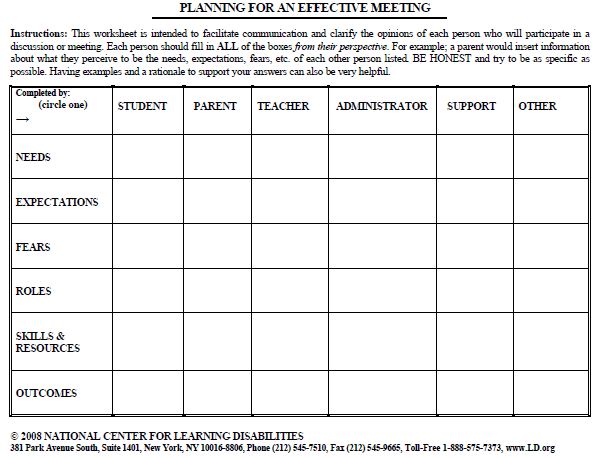
The tool is a chart that identifies information that can be gathered prior to the meeting by everyone attending.  It serves to get everyone on the same page and highlights discrepencies which can then be addressed.  The chart leaves room to jot down notes on the following issues:   
  • Concerns
  • Outcomes
  • Roles
  • Needs
  • Expectations
  • Resources
  • Skills
The chart, available from LD.org, looks like this (picture is cropped from it's original size):


I remember the points I need to gather information on with this with the acronym CORNERS.  This works well because by understanding another's ideas about what concerns them most, what they hope the outcome of the meeting will be, what they percieve their role to be, etc., essentially puts you in their corner.  Of course, it is also important that you explore and communicate your own CORNERS so that you can address areas causing you concern. 

Ways to Use the Meeting Chart Tool

This information can be shared a number of formal and informal ways prior to meeting.  To be most effective, LD.org recommends that each person writes their own views for each CORNERS issue, but then also fills out what they percieve as being other's CORNERS.  Don't forget to have the student also fill out a meeting chart of their own so that they can have their voice heard even if they are not present for the actual meeting. 

Another use of the chart would be to have each person attending fill out the chart in the designated column, and pass it along to the next person who does the same.  The finished chart will have each person relating their own needs and expectations and if a finished copy is supplied to each person then everyone will go into the meeting knowing what each wants to get from the meeting and what their frame of mind is.  It is important that all attendees are comfortable with this process, as some people will feel more comfortable knowing their sheet is being returned only to the classroom teacher or administrator rather than all attendees. 

If such a formal written account of CORNERS is not necessary, the information can be gathered informally with a quick phone call, email, or face-to-face encounter at pick-up or drop-off times.  Teachers can ask parents what their greatest concern is with regards to the meeting, what they hope the outcome of the meeting will be, and what they need from you to realize that goal.  Parents will likely appreciate having their feelings and concerns heard and will help to put them at ease.  Parents, too, can ask teachers very similar questions allowing them to gain important information and perspective.

If you don't choose to distribute the chart to everyone prior to the meeting, bring a copy into the meeting anyway.  This chart can be brought to the meeting and filled in as the meeting progresses.  If the meeting stalls or if it begins to go in an unproductive direction, refer to your chart.  Gapping holes in the chart may prompt you to ask certain questions that will help the meeting get back on track and help everyone feel heard.

A copy of a Meeting Chart is available through this link:  MeetingChart.pdf

The chart begins by asking about needs first.  This is a good place to start because it shifts thinking away from being defensive or being on the attack, to thinking about what their needs are and how they can be met.  It sets the focus as the rest of the chart is filled out, and hopefully sets the tone of the meeting that will follow.

I have altered the chart to suit my own needs, and it is pictured below.  If you would prefer copies of this alternate Meeting Chart, post a request at the end of post or contact me directly (see the About Me section) and I would be happy to send you a copy via email as an attachment.  If you are a a Techie and you know how I would go about uploading the pdf version to this website please let me know!  I have a pdf version saved, but I don't know how to upload it as link for visitors to download. 


Here is a different version of the Meeting Chart that I use for smaller meetings with just the student, or the parents. 

Thursday, July 28, 2011

Getting a Large White Board on the Cheap

I know it is not even August yet, and even though I won't be finding myself in a classroom of my own this fall, I can't help but begin to think about Classroom organization and setup.  It's like the migration of the robin every fall... I can't help it!

I loved using white boards in my classroom when I was teaching.  I found they were cleaner than using a chalkboard, and liked being able to use markers of several different colours. 

But I also remember how crazy-expensive large white boards can be.  It was difficult to find the budget for them.  Had I known that I could have made a white board for a fraction of the cost, I would have done it in a heartbeat... even though I am not overly handy!

I haven't tried it myself, but it looks quite easy and straight-forward.  According to this website a large board can be made for under $20.  That would likely retail anywhere from $150 to $200 easily.

Here's the link:
How To Make a Wall-sized White Board for Cheap

Tuesday, July 19, 2011

Commonly Misspelled Words - And How to Spell Them Correctly

I often look up the proper spelling of words while online, and sometimes I stumble across sites about some of the most commonly misspelled words in the English language.  I came across another one recently, but this one is a little different.

Not only does it list the words most likely to give your students trouble, it also gives mnemonic devices and other tricks to help them remember the proper spelling.

The site is appropriate for grade 7/8, but would also serve students in high school very well also, and could give teachers vocabulary ideas.

The website can be found at 100 Most Often Misspelled Words.  The link has also been included in the Resources section of this website. 

Happy Spelling!

Thursday, July 14, 2011

Encouraging Families to Read Together with Family Literacy Bags

Family Literacy Bags are great for encouraging families to spend time reading together.  The bags contain books and activities on a common theme or topic that children and their families can enjoy. 

Teachers can assemble the bags and send them home with students for a period of time, or parents can assemble the bags themselves and enjoy the books and activities as a family.

The Family Literacy Bags were developed by Reading Rockets and are designed to encourage hands-on fun and learning.  They have developed 10 bags that can be assembled quite quickly and easily by printing off the Activity Sheets and placing them in a large ziplock bag.  The books themselves can also be included in the bag.  Titles were specifically chosen because they are widely available in school and public libraries.  

The Family Literacy Bags available from Reading Rockets are completely free, and can be assembled quickly and easily.  Simply click on the Family Literacy Bag link, choose the topic that you would like to have your kit centered around, print it off, and borrow the books from your local public library.  The bags are appropriate for pre-K to about grade 2.

Family Literacy Bags include:
  1. Parent Information Sheet
  2. 1 Fiction and 1 Non-Fiction Book title on a common topic.
  3. Creativity Activity (hands-on craft)
  4. Imagination Activity (involving imaginative play, writing, or drawing)
  5. Get Real Activity (real-world experiences)
  6. Bookmark
  Check out these wonderful Family Literacy Bags for yourself:

What Happens Next?   Level PreK-K.  Explore what happens in The Very Hungry Caterpillar.  The list of suggested books includes nonfiction titles about caterpillars and butterflies and fiction books that emphasize concepts such as counting, days of the week, or how things happen in sequence. When assembling your Very Hungry Caterpillar Activity packet to send home, simply include a copy of The Very Hungry Caterpillar and one of the nonfiction or concept books suggested.
While designed as a school-to-home project, the Reading Rockets Literacy Bags are also great for summer programs, after-school programs, and home-schoolers.  Download PDF.

Explore Your 5 Senses.  Level K.  The featured books for the Explore Your 5 Senses Literacy Bag are Green Eggs and Ham, by Dr. Seuss, and Me and My Senses, by Joan Sweeney. In the Seuss classic Green Eggs and Ham, Sam-I-Am is ever so persistent in trying to convince you that green eggs and ham really are delicious! In the nonfiction book Me and My Senses, the author introduces children to the five senses and how they work independently and together.  While designed as a school-to-home project, the Reading Rockets Literacy Bags are also great for summer programs, after-school programs, and home-schoolers.  Download PDF

Explore Snow.  Level K.  The featured books for the Explore Snow Literacy Bag are The Snowy Day, written and illustrated by Ezra Jack Keats, and Snow Is Falling, written by Franklyn Branley and illustrated by Holly Keller. The Snowy Day, winner of the 1963 Caldecott Medal, tells the story of a young boy who wakes up to discover that a beautiful blanket of snow has fallen during the night. Snow Is Falling explores how snow can help plants, animals, and people to survive a harsh winter and thrive in the spring.  Download PDF.


Explore Farms and Farming.  Level K.  The featured books for the Explore Farms and Farming Literacy Bag are The Oxcart Man, by Donald Hall and illustrated by Barbara Cooney, and Farming, by Gail Gibbons. The Oxcart Man is the story of a self-sufficient farm of years past that takes readers through the rhythms of traditional life on a family farm. Farming explores farms, general farming practices, and the role the seasons and weather play in farming.  Download PDF


Explore Trees.  Level Grade 1.  The featured books for the Explore Trees Literacy Bag are The Lorax, written by Dr. Seuss, and Tell Me, Tree, by Gail Gibbons. The Lorax, The Lorax tells the story of how the greedy Oncle-ler hacks down Truffula trees in order to make Thneeds, a rather frivolous item that he believes everyone needs. The Lorax disagrees and tries to reason with the Once-ler to get him to see the consequences of his actions on the environment, but is ignored and the Lorax himself must flee when all is destroyed. In Tell Me, Tree, we learn how to identify different kinds of trees as well as the parts of a tree, inside and out. The book also discusses the important roles trees play in our lives.  Download PDF.

Explore Rocks.  Level Grade 1-2.  The featured books are The Jade Stone, a Chinese folktale adapted by Caryn Yacowitz, and the nonfiction book Rocks in His Head, by Carol Otis Hurst. Rocks in His Head tells a real life story, about actual events and real people. It's about one man's fascination with rocks and how his lifelong interest in rocks made him a very happy man. The story is also a delightful introduction to looking closely at rocks, while it shows the positive, life-changing power of pursuing a personal interest. The Jade Stone shows the relationship a sculptor has with stone. It also shows the honorable commitment the artist has to his craft.  Download PDF.

Explore the Ocean.  Level Grade 1.  The featured books are Flotsam by David Wiesner and The Magic School Bus on the Ocean Floor by Joanna Cole, illustrated by Bruce Degen. Flotsam, the beautifully illustrated wordless picture book that won the 2007 Caldecott Medal, reveals the secrets held in a wave-battered underwater camera found on the beach by a young boy. After the boy has the camera's film developed, imaginations are put to work as the reader views photographs of a curious world under the sea. In The Magic School Bus on the Ocean Floor, readers also get an unusual look at what's beneath the ocean's waves as Ms. Frizzle and her students take an exciting field trip to explore the animal and plant life of the ocean. The book also discusses tides, waves, and ocean topography.  Download PDF.

 Explore Cooking and Baking.  Level Grade 1-2.  The featured books are Easy as Pie by Cari Best and the nonfiction book How Did That Get in My Lunchbox? by Chris Butterworth. Easy as Pie tells the story a young boy, Jacob, who sets out to bake a peach pie to celebrate his parents' anniversary. Jacob is inspired by television personality Chef Monty who blends into his recipes great lessons for life. How Did That Get in My Lunchbox? illustrates the path food travels from the farm, to the market, to our homes, and finally, to our plates at home and in lunchboxes for school. Understanding "where our food comes from" can encourage healthier food choices.  Download PDF.

Explore Animals.  Level K.  The featured books for the Explore Animals Literacy Bag are Blueberries for Sal, by Robert McCloskey, and A Bed for the Winter, by Karen Wallace. Blueberries for Sal is a classic children's story about a human child and her mother and a bear child and his mother looking for berries. A Bed for the Winter is a DK Reader that explores homes different animals find for winter.  Download PDF.


Explore the Environment.  Level Grade 1.  The featured books for the Explore the Environment Literacy Bag are The Great Kapok Tree: A Tale of the Amazon Rain Forest, by Lynne Cherry, and I See a Kookaburra! Discovering Animal Habitats Around the World, by Steve Jenkins and Robin Page. The Great Kapok Tree tells the story of the rainforest animals who persuade a man not to cut down their tree by whispering in his ear while he sleeps. I See a Kookaburra! explores animals and habitats from around the world with cut-paper illustrations.
Download PDF.

Explore Food.  Level K.  The featured books for the Food Literacy Bag are Stone Soup, by Marcia Brown or John Muth, and Where Does Food Come From?, by Shelley Rotner and Gary Goss. Stone Soup describes how a group of travelers gets villagers to contribute ingredients to make a delicious soup. Where Does Food Come From? uses photographs and simple text to explore how lemonade, french fries, bread, peanut butter and other foods are made.  Download PDF.


Explore Folktales.  Level Grade 1.  The Explore Folktales Literacy Bag pairs a folktale that explains a something about nature with a nonfiction book. The featured books are Anansi the Spider: A Tale from the Ashanti, by Gerald McDermott, and The Moon Book, by Gail Gibbons. The Anansi story tells how the spider's sons rescue him from danger; their reward ends up becoming the moon. The Moon Book describes the moon's movement, phases, exploration, and beliefs about it.  Download PDF.


 Explore Music.  Level K.  The featured books for the Explore Music Literacy Bag are Mama Don't Allow, by Thacher Hurd, and A Day in the Life of a Musician, by Linda Hayward. In Mama Don't Allow, Miles forms a Swamp Band with his friends and they almost become dinner when they play for the Alligator Ball. A Day in the Life of a Musician is a DK Reader that follows a violinist through her day. Photos show her playing her violin in several different situations.  Download PDF.


Explore Dinosaurs.  Level Grade 1. The featured books for the Explore Dinosaurs Literacy Bag are Dinosaurs, by Gale Gibbons, and Danny and the Dinosaur, by Syd Hoff. During a visit to a museum, Danny encounters a dinosaur that turns out to be real and they leave the museum for a day of adventure in Danny and the Dinosaur. Gail Gibbons, a leading author in nonfiction for children, offers an excellent introduction to dinosaurs of many shapes and sizes in Dinosaurs.   Download PDF.


Explore Wild Things.  Level K.  The featured books are Where the Wild Things Are by Maurice Sendak and one of the nonfiction or concept books suggested (see the list below). In Where the Wild Things Are, Max's imaginative adventure begins the night he wore his wolf suit, making mischief and being downright rude. When he was sent to his room to cool off, he travels to the land of the Wild Things where he is crowned king only returning when he's ready to be loved again. The list includes both nonfiction titles about night and fiction books that emphasize concepts such as dealing with feelings and using your imagination.  Download PDF.

Explore Sleep and Hibernation.  Level K.  The featured books for the Explore Sleep and Hibernation Literacy Bag are Time to Sleep, by Denise Fleming, and Animals Don't Wear Pajamas, by Eve Feldman. In Time to Sleep, Bear and his animal friends help each other get ready for winter and hibernation. In the nonfiction book Animals Don't Wear Pajamas, Feldman introduces children to the way that 16 different animals get ready to sleep.   Download PDF.


Explore Time.  Level Grade 1.  The featured books for the Explore Time Literacy Bag are The Very Grouchy Ladybug, by Eric Carle, and Telling Time: How to Tell Time on Digital and Analog Clocks!, by Jules Older, illustrated by Megan Halsey. The Very Grouchy Ladybug follows a cranky bug through the hours of the day, as she argues with many animals. Classic Carle illustrations include beautiful animals, a clock, and the sun moving across the sky. Telling Time provides a fun explanation of time concepts and how to read clocks.  Download PDF.


Wednesday, June 29, 2011

Making Technology Part of Your Back to School Planning

For many families, the back-to-school season means shopping for school supplies and new clothes. As it gets closer to the first day of school, for a young child it means watching the mailbox for a letter from his new teacher, or for older students it means going to school to register and pick up their schedule.

With all the excitement of the annual back-to-school rituals, technology is often overlooked. However, thinking about technology tools and supports can facilitate the back-to-school transition for students with learning disabilities. In addition, spending some time learning new technologies before school starts means that more time will be available to focus on using the technology to complete assignments once school begins.

To help parents, students, teachers, and administrators complete their back-to-school planning, some suggestions are provided below. Following the suggestions are some important conversations that should be held at the beginning of the school year.

Preparing for the School Year: Technology


Ideas for Parents


  1. If you have a computer at home, talk with your child about the programs that she or he knows how to use. Does she or he know how to use the word processor? Can your child make a graph in a spreadsheet and copy it into a report in a word processor? Can your child make a slide show presentation using PowerPoint?
  2. Homework can be challenging for students and their parents. Get a head start on planning for homework by downloading a free copy of an excellent booklet, "25 Tips for Handling Homework."
  3. Does your child need assistive technology to be successful in school? For an introduction to assistive technology consideration rights and responsibilities, read "Assistive Technology for Kids with Learning Disabilities - An Overview."

Ideas for Students


  1. Many schools consider the basic technology toolkit to include a word processor, email, presentation software, and a web browser. How skilled are you with each of these tools? Compare your skills to these National Standards.  What other tools could you add to your toolkit?
  2. Begin planning for the homework you will receive this new school year. Locate a few web sites that will help you with your homework and save them as bookmarks or favorites. To start your explorations, consider: KidsClick, Yahooligans, and Cybersleuth.
  3. Bored during the final days of summer? Just for fun, check out the following Web sites: sparktop.org, 4kids.org, How Stuff Works.

Ideas for Teachers


  1. Increased pressure to help all students achieve high academic standards has caused some rigidity in educators' willingness to make instructional accommodations and modifications. Read this article about three meanings of fairness.   Consider having all of your colleagues read and discuss what this article means for students with learning disabilities and other struggling students.
  2. Universal design for learning (UDL) is a relatively new philosophy for using technology to enhance learning for all students. Read more about UDL by accessing the free online publication, Teaching Every Student in the Digital Age: Universal Design for Learning.  Consider how the principles of UDL might apply to your classroom this year as you design learning activities.
  3. Learn more about assistive technology by reading this online article, "Assistive Technology: What You Need to Know." Use this information to advocate for students with disabilities. To explore specific assistive technology solutions, visit the Learning Disabilities and Assistive Technology page on the Tools for Life Web site.

Ideas for Administrators


  1. How prepared are your teachers to fulfill their responsibilities associated with the consideration and use of assistive technology for students with learning and other disabilities? Learn more about the policy and practical issues of these IDEA mandated responsibilities in Enhancing System Change and Academic Success through Assistive Technologies for K-12 Students With Special Needs.
  2. Learn more about assistive technology by downloading the free booklet, "A Resource Guide for Teachers and Administrators about Assistive Technology."
  3. What is your plan for dealing with the digital divide? One suggestion is to provide portable keyboards like AlphaSmart or Laser PCs or laptop computers for students to checkout and take home to complete writing assignments.

Essential Conversations


To make this new school year as successful as possible, parents, teachers, and administrators need to commit to working together and keeping the lines of communication open. At the beginning of the school year, teachers and parents should have a number of conversations that outline expectations for the school year, how to deal with frustration, reasonable timelines for completing learning activities, reasonable accommodations and modifications, etc.

As schools are under more pressure to demonstrate that each student in making adequate yearly progress (AYP), we may forget that the ultimate outcome of schooling is to produce citizens engaged in lifelong learning. As a result, there is a clear need to understand the role of technology for enhancing academic performance. Unfortunately, assistive technology for students with learning disabilities is increasingly viewed by some as equivalent to cheating. The statement, "We have high standards," is being used as a shield for curriculum, instruction, and assessment that takes the form of one-size-fits-all. Obviously, much more work remains to be done to help everyone understand the role of assistive technology for students with learning disabilities.


Dave L. Edyburn, Ph.D., is an Associate Professor in the Department of Exceptional Education at the University of Wisconsin-Milwaukee. He earned his Ph.D. in special education from the University of Illinois, Champaign-Urbana. He has classroom teaching experience in both learning disabilities and behavior disorders at the middle school and secondary levels.

Dr. Edyburn's teaching and research interests focus on the use of technology to enhance teaching, learning, and performance. He has authored over 100 articles and book chapters on assistive and instructional technology. He is past editor of Learning Disabilities Quarterly. He is co-editor of the new book, Handbook of Special Education Technology Research and Practice and editor of Special Education Technology Practice.

For many families, the back-to-school season means shopping for school supplies and new clothes. As it gets closer to the first day of school, for a young child it means watching the mailbox for a letter from his new teacher, or for older students it means going to school to register and pick up their schedule.

With all the excitement of the annual back-to-school rituals, technology is often overlooked. However, thinking about technology tools and supports can facilitate the back-to-school transition for students with learning disabilities. In addition, spending some time learning new technologies before school starts means that more time will be available to focus on using the technology to complete assignments once school begins.

To help parents, students, teachers, and administrators complete their back-to-school planning, some suggestions are provided below. Following the suggestions are some important conversations that should be held at the beginning of the school year.

Preparing for the School Year: Technology


Ideas for Parents


  1. If you have a computer at home, talk with your child about the programs that she or he knows how to use. Does she or he know how to use the word processor? Can your child make a graph in a spreadsheet and copy it into a report in a word processor? Can your child make a slide show presentation using PowerPoint?
  2. Homework can be challenging for students and their parents. Get a head start on planning for homework by downloading a free copy of an excellent booklet, "25 Tips for Handling Homework."
  3. Does your child need assistive technology to be successful in school? For an introduction to assistive technology consideration rights and responsibilities, read "Assistive Technology for Kids with Learning Disabilities - An Overview."

Ideas for Students


  1. Many schools consider the basic technology toolkit to include a word processor, email, presentation software, and a web browser. How skilled are you with each of these tools? Compare your skills to these National Standards.  What other tools could you add to your toolkit?
  2. Begin planning for the homework you will receive this new school year. Locate a few web sites that will help you with your homework and save them as bookmarks or favorites. To start your explorations, consider: KidsClick, Yahooligans, and Cybersleuth.
  3. Bored during the final days of summer? Just for fun, check out the following Web sites: sparktop.org, 4kids.org, How Stuff Works.

Ideas for Teachers


  1. Increased pressure to help all students achieve high academic standards has caused some rigidity in educators' willingness to make instructional accommodations and modifications. Read this article about three meanings of fairness.   Consider having all of your colleagues read and discuss what this article means for students with learning disabilities and other struggling students.
  2. Universal design for learning (UDL) is a relatively new philosophy for using technology to enhance learning for all students. Read more about UDL by accessing the free online publication, Teaching Every Student in the Digital Age: Universal Design for Learning.  Consider how the principles of UDL might apply to your classroom this year as you design learning activities.
  3. Learn more about assistive technology by reading this online article, "Assistive Technology: What You Need to Know." Use this information to advocate for students with disabilities. To explore specific assistive technology solutions, visit the Learning Disabilities and Assistive Technology page on the Tools for Life Web site.

Ideas for Administrators


  1. How prepared are your teachers to fulfill their responsibilities associated with the consideration and use of assistive technology for students with learning and other disabilities? Learn more about the policy and practical issues of these IDEA mandated responsibilities in Enhancing System Change and Academic Success through Assistive Technologies for K-12 Students With Special Needs.
  2. Learn more about assistive technology by downloading the free booklet, "A Resource Guide for Teachers and Administrators about Assistive Technology."
  3. What is your plan for dealing with the digital divide? One suggestion is to provide portable keyboards like AlphaSmart or Laser PCs or laptop computers for students to checkout and take home to complete writing assignments.

Essential Conversations


To make this new school year as successful as possible, parents, teachers, and administrators need to commit to working together and keeping the lines of communication open. At the beginning of the school year, teachers and parents should have a number of conversations that outline expectations for the school year, how to deal with frustration, reasonable timelines for completing learning activities, reasonable accommodations and modifications, etc.

As schools are under more pressure to demonstrate that each student in making adequate yearly progress (AYP), we may forget that the ultimate outcome of schooling is to produce citizens engaged in lifelong learning. As a result, there is a clear need to understand the role of technology for enhancing academic performance. Unfortunately, assistive technology for students with learning disabilities is increasingly viewed by some as equivalent to cheating. The statement, "We have high standards," is being used as a shield for curriculum, instruction, and assessment that takes the form of one-size-fits-all. Obviously, much more work remains to be done to help everyone understand the role of assistive technology for students with learning disabilities.


Dave L. Edyburn, Ph.D., is an Associate Professor in the Department of Exceptional Education at the University of Wisconsin-Milwaukee. He earned his Ph.D. in special education from the University of Illinois, Champaign-Urbana. He has classroom teaching experience in both learning disabilities and behavior disorders at the middle school and secondary levels.

Dr. Edyburn's teaching and research interests focus on the use of technology to enhance teaching, learning, and performance. He has authored over 100 articles and book chapters on assistive and instructional technology. He is past editor of Learning Disabilities Quarterly. He is co-editor of the new book, Handbook of Special Education Technology Research and Practice and editor of
Special Education Technology Practice.

Friday, June 24, 2011

Schools Struggle to Balance Digital Innovation and Academic Accountability

Educators struggle through trial and error to forge new approaches that work

Article Tools
When North Carolina's Mooresville Graded School District launched a 1-to-1 laptop initiative three years ago, Superintendent Mark Edwards prepared himself for an"innovation dip," a small drop in student performance as educators and students adjusted to the new approach.

He says he anticipated it would take time for students and teachers to master the use of laptop computers, digital curricula, and more personalized ways of teaching and learning. Though he believed that in the long run the approach would benefit students and be borne out in test scores, Edwards says he and the school board were mentally and philosophically prepared for a drop in scores over the first couple of years as the 5,600-student district worked out the kinks.

But just the opposite happened.

In three years, the district went from ranking 30th in the state in school performance measurements to fourth, and Edwards says he is gunning for first place this year. District officials saw boosts in other areas, too. Suspensions dropped at the high school level by 65 percent and districtwide by 50 percent, Edwards says.

For an example of education innovation in New York City,
read the related story, "Taking Risks and Achieving Results,"
June 15, 2011.
 
"Students like using relevant tools and materials," he says. "The kids are more engaged and excited about school. They're doing things in class and saying, 'I will do this in my future.' "

Click here for full article.

Don't Let Kids Take a "Braincation" This Summer

This is an article found in the Dayton Daily News in the USA.  The summer is full of fun, local learning activities!  Local museums, art galleries, festivals, and libraries are just the beginning

By Debbie Juniewicz, Contributing Writer 6:07 PM Tuesday, June 21, 2011

While the backpacks are tucked in the closet and textbooks are nowhere to be found, summer vacation doesn’t have to be a vacation from learning.

And it shouldn’t be.

“It is well documented that keeping kids engaged in the summer really does matter,” said Katie Kinnucan-Welsch, chairwoman of the department of teacher education at the University of Dayton School of Education and Allied Professions. “Particularly for kids who are struggling with school, but really for all kids, it’s important to have continuous opportunities for learning.”

But you won’t have to worry about groans and eye rolling because summertime means countless fun and free learning opportunities throughout the Miami Valley.

Natural learners

“If left to their own devices, children are natural learners and are naturally curious,” Kinnucan-Welsch said. “Once you provide them with an opportunity for learning, you can stand by and let them go.”

Those opportunities are available on a daily basis, whether it’s a word game in the car, a walk through the park or a trip to the library.

“Every day is an opportunity to learn something new and kids should have multiple learning experiences every day,” Kinnucan-Welsch said.

That doesn’t mean learning has to be a chore. It could be as simple as having a conversation. Kinnucan-Welsch suggests pointing out unusual objects as you drive by or playing vocabulary or rhyming games in the car.

“Conversations are important for vocabulary development,” she said.

But it isn’t just about introducing new words or concepts. How you introduce them can make all the difference.

“The old fashioned way of learning was to memorize,” she said. “But a more lasting way to learn is having the concept be part of an authentic context.”

Learning the names for plants or animals while hiking, working with numbers to figure out percentage-off prices on the department store sale rack, or even keeping track of bowling scores in your head instead of relying on the monitor are all examples of incorporating learning into everyday activities.

Turning the page

According to the International Reading Association and the National Council of Teachers of English, summer vacation can have a significant negative effect on student learning. The solution is simple — summer reading. Regular summer reading can prevent documented reading achievement losses.

“Parents need to tune into what their kids are interested in and encourage them to learn more about it,” Kinnucan-Welsch said.

Letting young readers choose their books increases the likelihood that they will make it to the last page. If incentives are helpful, many local libraries and bookstores offer summer reading clubs complete with prizes.
If parents want even more resources, the IRA/NCTE ReadWriteThink website offers materials for children from kindergarten through high school. Printouts, activities, games, projects and even podcasts are available online.

But while the Internet is a good starting point, there is no substitute for getting out and learning firsthand.

Living and learning 
in the Miami Valley

Five Rivers MetroParks
Toddlers and preschoolers
Children’s Discovery Garden at Wegerzyn Gardens MetroPark. Interactive programming at 2 p.m. Mondays, Wednesdays and Thursdays through Aug. 31.
Butterfly House at Cox Arboretum MetroPark, July 9 through Labor Day.
The historical farm at Carriage Hill MetroPark or the sustainable farm at Possum Creek MetroPark provide children with an up-close look at animal husbandry and food production in two very different ways.
Tike Hike programs at 
10 a.m. on various days at various MetroParks facilities. Each hike is geared toward young children and introduces them to the beauty of nature.
School-aged children
The Passport to Nature program gives children and their parents incentives for learning about nature and discovering the world around them through basic science and biology.
Fishing at several locations in the MetroParks does not require an Ohio fishing license, including: Cedar Lake and North Woods Pond at Carriage Hill; Eastwood lagoon and Blue Lake at Eastwood MetroPark; the ponds and Argonne Lake at Possum Creek; and Dogwood Pond and Lake George at Twin Creek.
Tweens and teens
Nature programs suggested for “all ages” or “14 and older” are appropriate for older children who already have a working knowledge of basic science and biology concepts. CafĂ© Sci programs are for children who are curious about nature and want to expand their knowledge. The Environmental Film series features films and engaging discussions.

Dayton Metro Library
From story time to craft projects and puppet shows to chess clubs, the Dayton Metro Library branches have a calendar packed with daily children’s activities. There are programs geared toward the preschool set, grade school children and teens.
There are reading clubs for grades six and younger (Make a Splash), teens (Heroes @ Your Library) and adults (Novel Destinations), with prizes available at all levels.

Around town
The Dayton Art Institute Experiencenter provides formal and informal learning and recreational activities for children and their families.